Where should I farm in Lineage II?
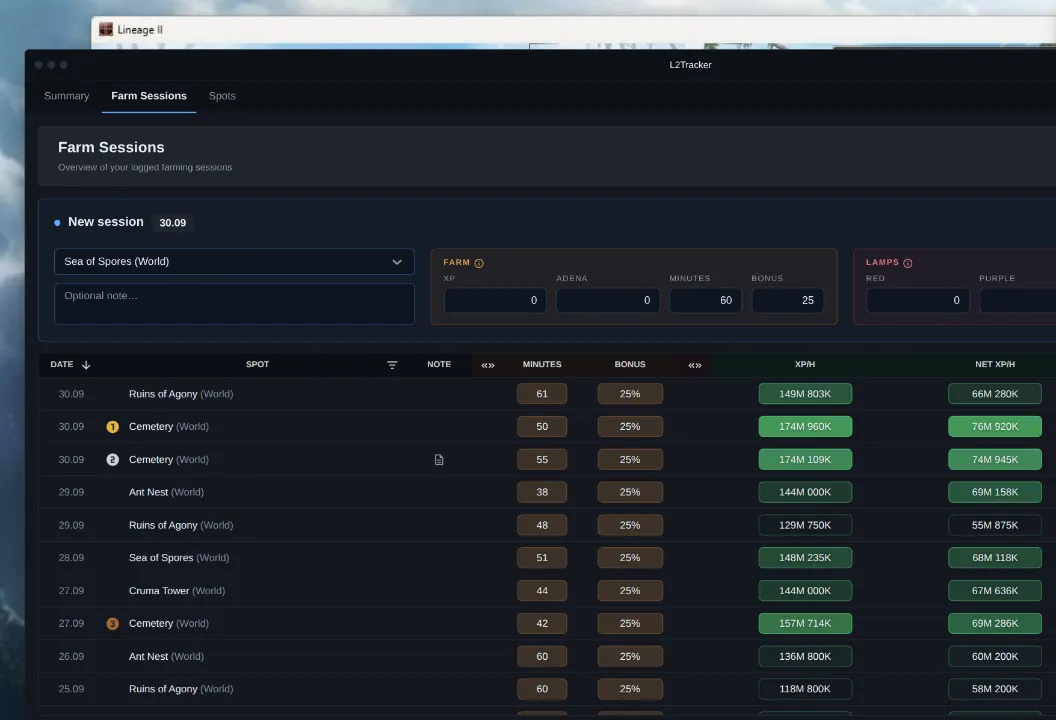
Wherever you earn the most for your time: XP when leveling, Adena when farming it. That depends on your class, level and gear, so no list made for everyone can tell you. L2Tracker ranks spots by your own sessions, and shows which ones pay reliably and which had one lucky run. Read how to compare farm spots for leveling and Adena.
Can it replace my farming spreadsheet?
If you log your runs in Excel or Google Sheets, yes. Type in a session's XP, Adena and minutes, or read them from a Play Report screenshot, and the rates are worked out for you, with no formulas to keep. There is no import from an existing sheet.
What stats does it show?
For each session: XP, NET XP and Adena per hour or per minute, as you choose, and what the Magic Lamps added. For each spot: its rank by your latest session there, and your worst, typical and best rate once you have farmed it twice. And one chart of XP rate against Adena rate for all your spots.
Which servers does it work on?
It was built on Lineage II Essence: the Play Report it reads is part of the Essence client, and the spots that come with your account are Essence's. On any Essence server, official or private, L2Reborn's among them, a session can be typed in or read from a Play Report screenshot on the website. Before you use the desktop companion on a private server, check that server's rules. Older chronicles such as Interlude or High Five have no Play Report, so there sessions are typed in by hand.
Do I need the desktop companion?
No. On the website a session can be typed in or read from a Play Report screenshot. The companion, for Windows 10 or later, saves you that step by reading the Play Report while you farm.
What does the companion do with my game?
It only looks: about every ten seconds while you track, it takes a picture of the game window and reads the Play Report in it with the text recognition built into Windows. It never interacts with the game: it does not read its memory, change its files, or press keys or move the mouse for you. It is also a new app, not the bot that once went by the L2Tracker name. Whether a tool like this is allowed is up to your server's rules, so check them first.
Is it free?
Yes, for now, the desktop app included, and no payment details are asked for. Paid plans will come with their own terms, shown before anything is charged.
Where can I report a bug or suggest a feature?
On the L2Tracker Discord: report bugs in #bug-reports, suggest features in #feature-requests, and ask in #help, about the website or the companion. Players compare their farm spot rates there too.